Usage Guide
There are two steps to using AjaxView:
- Subclass
ajaxview.AjaxViewand use it as an enhancedTemplateView - Use the
ajaxview.ajaxdecorator to expose methods to your template
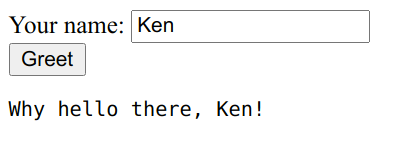
Consider the following example:
from ajaxview import AjaxView, ajax


class MyController(AjaxView):
    template_name = 'hello.html'

    @ajax
    def greetings(self, name):
        return f'Why hello there, {name}!'
In your hello.html
<!-- Necessary to include functions that communicate with Python class -->
{{ ajax_view }}

Your name: <input id="name"> <br>
<button onclick="sayHello()">Greet</button> <br>
<pre id="response"></pre>

<script>
  async function sayHello() {
    // This calls greetings on the server and serializes the response
    const message = await greetings({name: document.getElementById('name').value})
    document.getElementById('response').innerText = message
  }
</script>
Notice that because we have a greetings method on your controller class, an identically named JavaScript
function, greetings() is usable in your template. When you call that function, arguments you pass in JavaScript make
their way to the Python server and back again -- actually using Ajax methods and serialization is all taken care of.
For simple use cases, this can be compelling. The Ajax endpoint is the controller itself, with the POST method. (This means your views using this class cannot accept POST data -- they're expected to be purely ajax pages!)
Parameters
All parameters are expected to be named parameters in JavaScript. Eg,
@ajax
def tell_story(self, noun, verb, adjective):
    return f'The {adjective} {noun} decided to {verb}'
In JavaScript:
sentence = tell_story({noun: 'bird', verb: 'fly', adjective: 'restless'})
// 'The restless bird decided to fly'
DateTime parameters
All serialization is done through JSON, however if you need datetime parameters on input, Ajax View will recognize type annotation and deserialization ISO-formatted datetimes from JavaScript:
@ajax


from datetime import datetime


def expect_the_future(self, when: datetime):
    ...
No other convenience features are provided for datetimes, so if you need more comprehensive serialization support, you may consider using a more advanced framework.
Exceptions
Errors will be thrown by the wrapper functions generated for your view.
Aside from bad requests, which should not happen if you use the auto-generated wrapper functions generated by
include {{ ajax_view }}, errors should fall into two categories:
- Server Errors (ie, bugs)
- Client Errors (ie, errors we tell the browser about to tell the user)
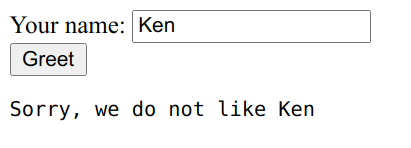
Client Errors are unique in that we do want to tell the browser about why the error occurred, presumably it's caused by or actionable for the user. Validation errors are likely in this category, for instance.
To raise a client error, simply raise a self.ClientError instance with your error message:
@ajax
def greetings(self, name):
    if name == 'Ken':
        # This will be available to the user to see
        raise self.ClientError('Sorry, we do not like Ken')
    else:
        return f'Why hello there, {name}!'
JavaScript:
async function sayHello() {
  try {
    const message = await greetings({name: document.getElementById('name').value})
    document.getElementById('response').innerText = message
  } catch (error) {
    if (error.status === 400) {
      // Oh, it's our fault
      document.getElementById('response').innerText = error.errors[0]
    } else {
      throw(error)
    }
  }
}
Logging
Exceptions are logged using the root level logger. You can override what logger is used by overriding the get_logger method:
class MyController(AjaxView):
    def get_logger(self):
        ...